
Who this is for: the person who draws the start lists on contest day and records the results. No course is needed. Take a quiet evening beforehand and do one practice run.
Language: the application speaks German and English. The screenshots below show the English interface. You switch with the DE and EN buttons at the top right; the choice stays on the device. A few buttons on the surrounding website are still German, and this manual names them as they appear on screen.
What contest management does
Contest management is a separate application inside this site. It draws the start order, records the flights at the line and calculates the scores under the FAI rules. It runs on the device you have with you, so on a phone, a tablet or a laptop, and it keeps working without a network.
Registrations, entry fees and messages to competitors are not part of it. Those stay in the registration manager of the competition. Contest management starts where the entry list is finished.
Which rules apply
The FAI Sporting Code, section F3G. The same multi-task contest as F3B — duration, distance, speed —, except that a motor replaces the winch.
One difference shows up in every entry: the start height is deducted. Every metre up to 250 costs half a second, every metre above that costs three (F3G.2.6 a). At 250 m that is 125 points, at 300 m already 275 — the second step is a deterrent, not a calculation.
Everything else is word for word the same as F3B: the landing table, the 1,000-point normalisation, the dropped score, an annulled group, even the minimum group sizes.
Practise first
For the first run there is a practice competition. It belongs to you alone, has 54 invented competitors, 26 of them in six teams of three to six pilots, is visible to nobody else and disappears by itself after 48 hours. Everything about it is allowed to go wrong.
The field is deliberately that large: with a handful of pilots the draw produces a single group, no score is ever dropped, and there are no team mates to separate. Practising on that means practising on a competition that does not exist. With 54 pilots there are six groups in the duration task and eleven in the distance task, and the teams spread across them as they would on a real day.
Create a practice competition. You land straight in the application. The same route is in My area under Wettbewerbsleitung ausprobieren (try contest management).
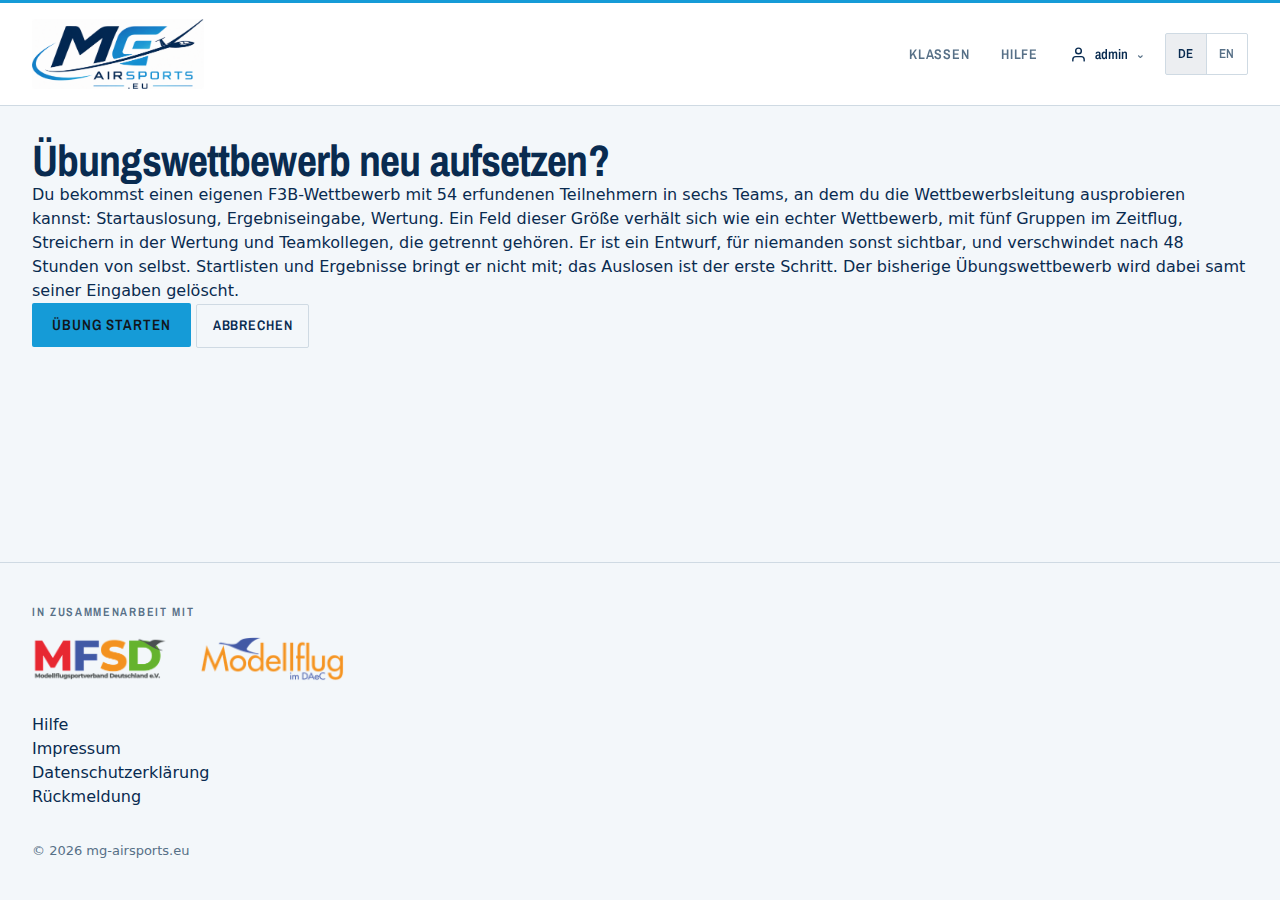
Calling it a second time resets the exercise: the old practice competition is deleted with all its entries and a fresh one is created. A real competition needs organiser access, practising does not.
Starting the competition
The contest day begins with a deliberate step. The cockpit carries a button Wettbewerb starten (start the competition) — while it has not been pressed it is the highlighted action, afterwards it steps back.
The button does three things at once:
- The draw counts. From here it is the draw of this competition and no longer a draft on somebody's device.
- The start list becomes public. Anyone who knows the link sees it — and competitors can mark themselves and their team in it.
- Devices can be rolled out. Only now can a foreign device join the queue with the enrolment secret. Before that it is turned away: a device that has the draw pulled out from under it is worse than one that is not there yet.
Without a draw on the server it does not work, and the form says so instead of offering a button that does nothing. So the order is: F3B Wettbewerbsleitung starten → draw → Publish the draw → Wettbewerb starten.
You need your own device before that — it is what you draw with. The way through the cockpit therefore stays open at all times; what is locked is rolling out to others.
The start can be taken back. No new devices can enrol afterwards; confirmed ones keep working, and whoever wants to stop them revokes them under Devices and access. The start list stays public — it was public, people have seen it, and letting it vanish silently confuses more than it helps. Hiding it is available on the same page.
What the start does not do: freeze the assignments hard. The rules demand changes during the day — a reflight gets a new group under F3G.1.6 d, and after an interruption of more than 15 minutes start blocks become scoring groups (F3G.1.12 c). What is prevented instead: a scoring group that comes neither from the draw nor from a recorded plan is no longer accepted by the server. The group decides the 1,000-point base and with it the score; it must not be freely selectable.
Registering a device
You open the application from the competition: in the cockpit, the button
F3B Wettbewerbsleitung starten (start F3B contest management) leads into the app.
The device receives its own access key. The key sits behind the # in the
address, is stored on the device at once and removed from the address bar. A browser does
not send a fragment behind the # to the server, so the key appears in no
server log.
What follows from that for the day:
- One device, one call. For a second entry station at the line, press the button again. Each device gets its own key.
- Do not forward the link. Whoever holds it may write results.
- Clearing the browser data removes the key. Then start again.
On the overview, enter the name of the entry station, for example “Recorder A” or “Line centre”. It is logged with every change, so a question in the evening can be traced back to the station that entered a value.
The three device classes
A device that is not started from the cockpit enrols itself: it gives a name, the enrolment secret you hand out, and what it is for.
| Class | Release | May |
|---|---|---|
| Timekeeping, scoring or contest management | you confirm it and give it a role | results for every participant, the draw, publishing — within the scope you choose |
| Participant device | active at once, revocable at any time | only the values of the start numbers entered |
| View only | active at once, revocable at any time | nothing. Start lists and results can be looked at |
The role of a management device is set when you confirm it: contest management, scoring, timekeeping or stand-in. It decides only who may resolve a conflict — not who may write. If two devices write to the same value, the conflict is reported and never silently overwritten.
A participant or view-only device holds the lowest rank, fixed. It gets no role, not even by accident.
Participant devices
A participant chooses Participant device and enters their start numbers — one or several, separated by commas. The server looks each one up in the published start list and binds the session to those participants. A device cannot claim the binding; it is assigned.
Several, because a device on the line gets passed around. If it carries more than one, a selector sits at the top of the app: who is entering right now? That selection only decides whose flights are shown — what the device may do sits on the server and cannot be changed on the device.
A participant device does not wait for your confirmation. On a contest day twenty phones arrive at once, and releasing each one holds up the morning. It is ready straight away, appears in the device list and can be blocked there at any time.
That has a price, and it is deliberate: a device that released itself only ever writes proposals — even when the competition is set to immediate. Only a device you confirmed in the device list may count at once. Then a person has vouched for it, and that is the whole point.
For that, a self-releasing device needs a device key. It is created in the browser, the secret half never leaves the device, and every entry is sealed with it. Without one — a very old browser, an insecure origin — only enrolment as a management device is possible, which you confirm. That is not red tape: with a management device you are the proof of what the device is. With a phone nobody has looked at, the key is.
German or English
Two buttons at the top right, DE and EN, switch the language of the whole application: menu, forms, messages and print views. The choice stays stored on the device, offline as well. Without a choice of your own, the app takes the language you use the website in.
The language changes the display only. Scoring is the same in both.
The overview
Before the draw there is no state to show, so the overview names the next step.
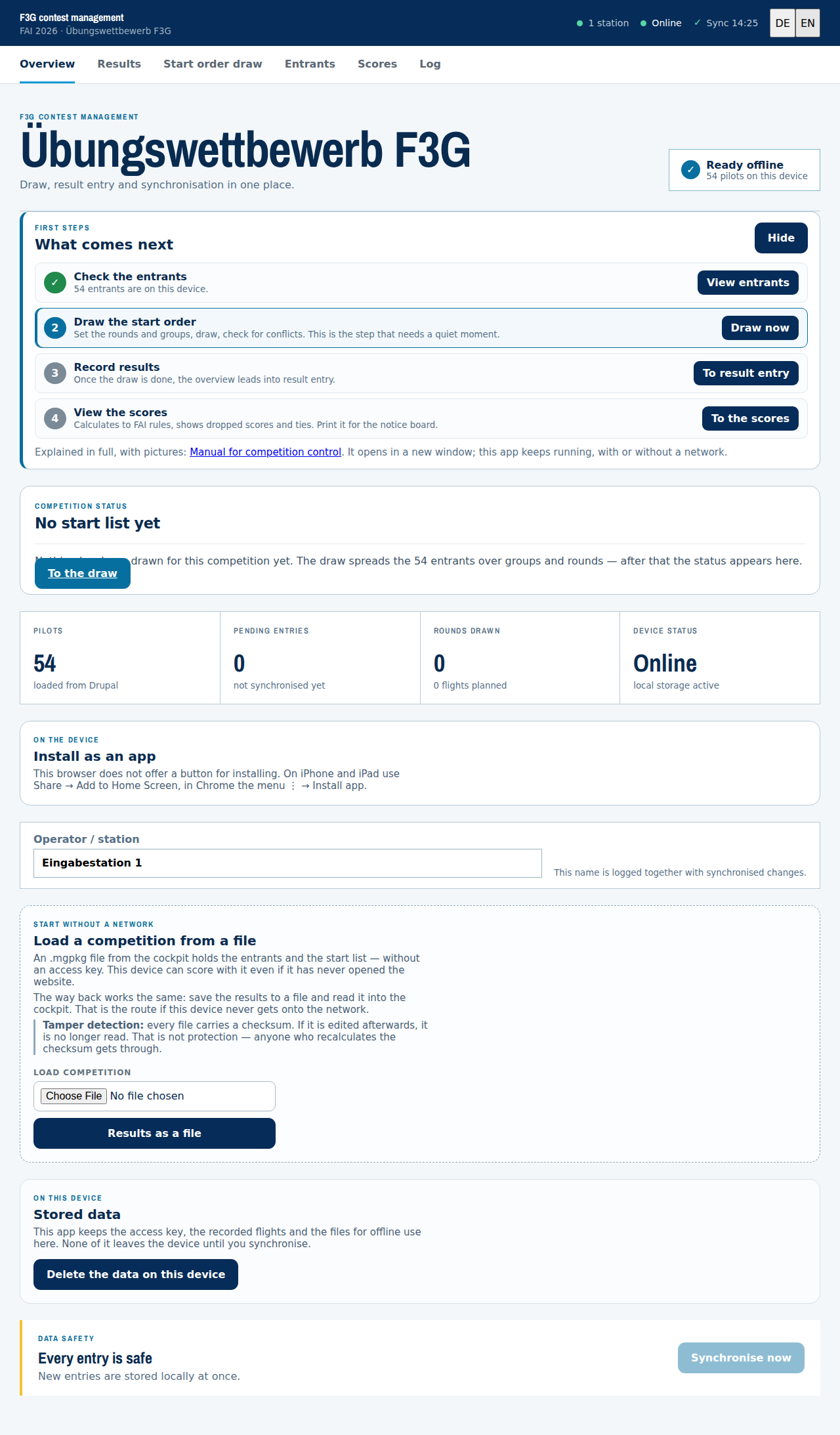
At the top are the first steps: four items with their state, the first open one highlighted, each with a way to get there. Anyone who uses the application once a year does not have to keep the order in their head. The list can be hidden, and that choice stays on the device.
Below it is the question that comes first on contest day: is the competition valid yet? Under F3G.2.1 b) one completely flown task of the first round is enough. While that is missing, the panel lists what is outstanding, with round, task and the names of the pilots without a value. Next to it, it counts the complete rounds. A championship needs five (F3G.2.8), and there is a switch for that.
Once the draw is done, the contest state appears: how many of the planned flights are recorded, a grid of round and task with the numbers per cell, and the next open item as a link. The figure, for instance “7/8”, always stands next to the colour, because colour alone is hard to read on a tablet in bright sun.
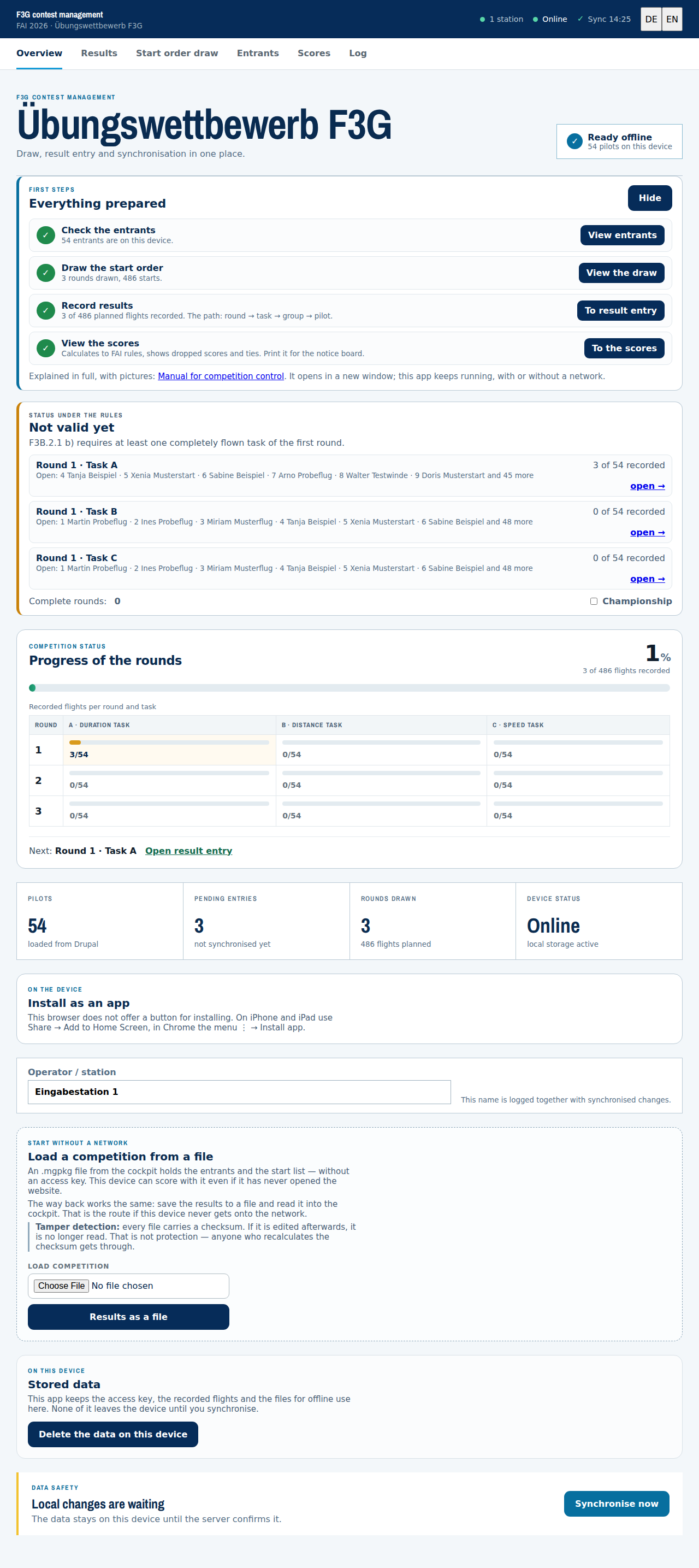
Every cell of the grid is a link. It leads to the groups of that round and task, and from there on to result entry.
The four tiles below answer four questions: Pilots (are all competitors on this device?), Pending entries (how much has not reached the server?), Rounds drawn and Device status.
Participants
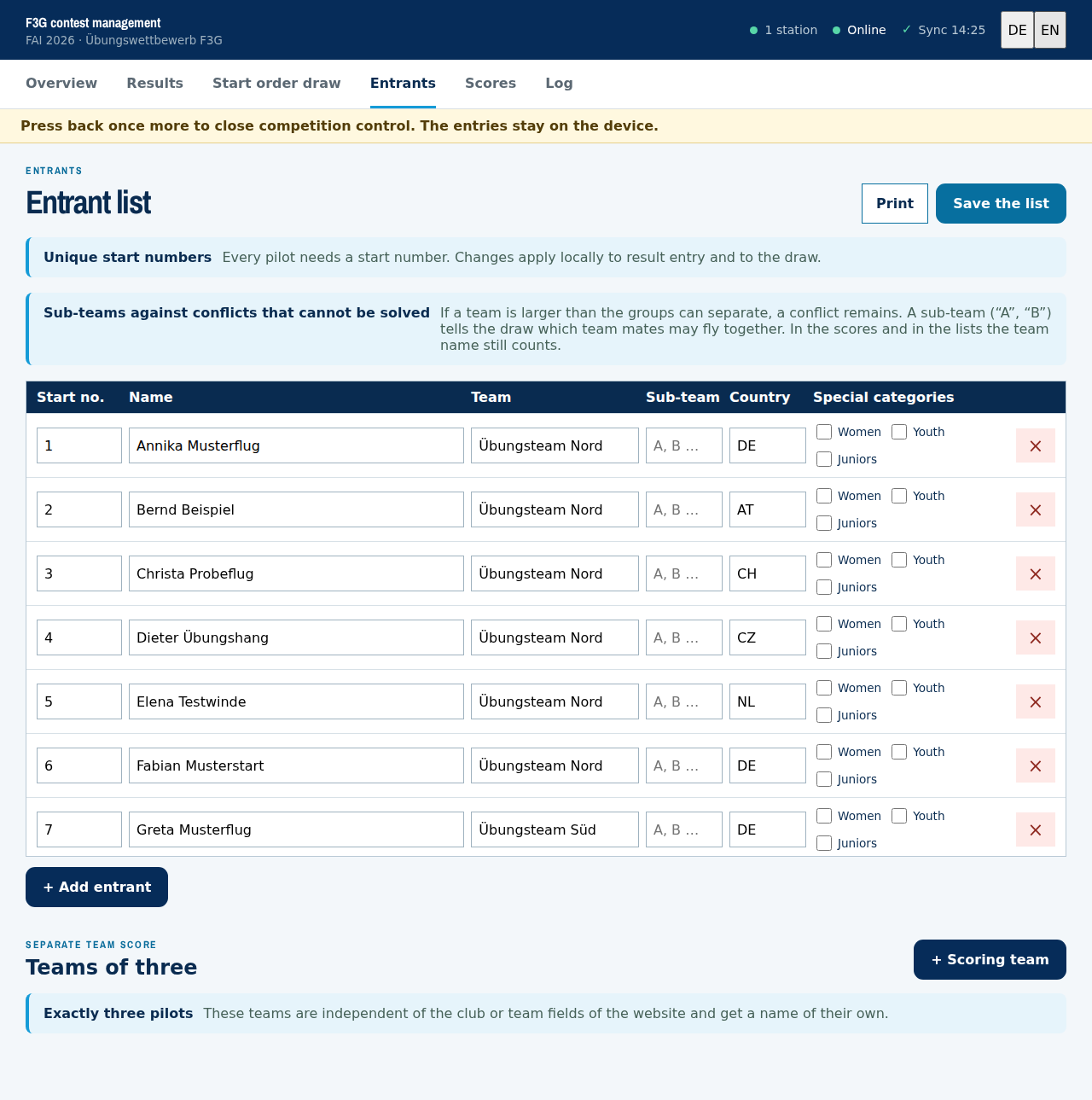
The participant list comes from the registrations of the competition and is stored on the device, so it is complete without a network too. The start numbers are here, and everyone at the line asks for those.
Start number and starting position are two different things. The start number belongs to the competitor: it is handed out consecutively in round 1 and stays his from then on. The starting position is the running number inside his group and changes every round, because the field is shuffled again. From round 2 the list therefore shows two different numbers side by side — mix them up and the wrong competitor is called to the line. Group cards, the group table and every printed sheet show both.
Start order draw
The draw distributes the competitors across groups and rounds. It is the first step of the morning and the step you need quiet for.
The draw is made per round, not per task. A, B and C of a round fly the same order; only the division into groups differs. A pilot who starts third in task A also starts third in task B and merely sits in a different group, because B cuts the list more finely. From round to round the order is drawn anew.
The draw ID is the draw: the same ID always produces the same result.
Every Draw again therefore counts it up (#2, #3).
Entering an old ID brings the old draw back.
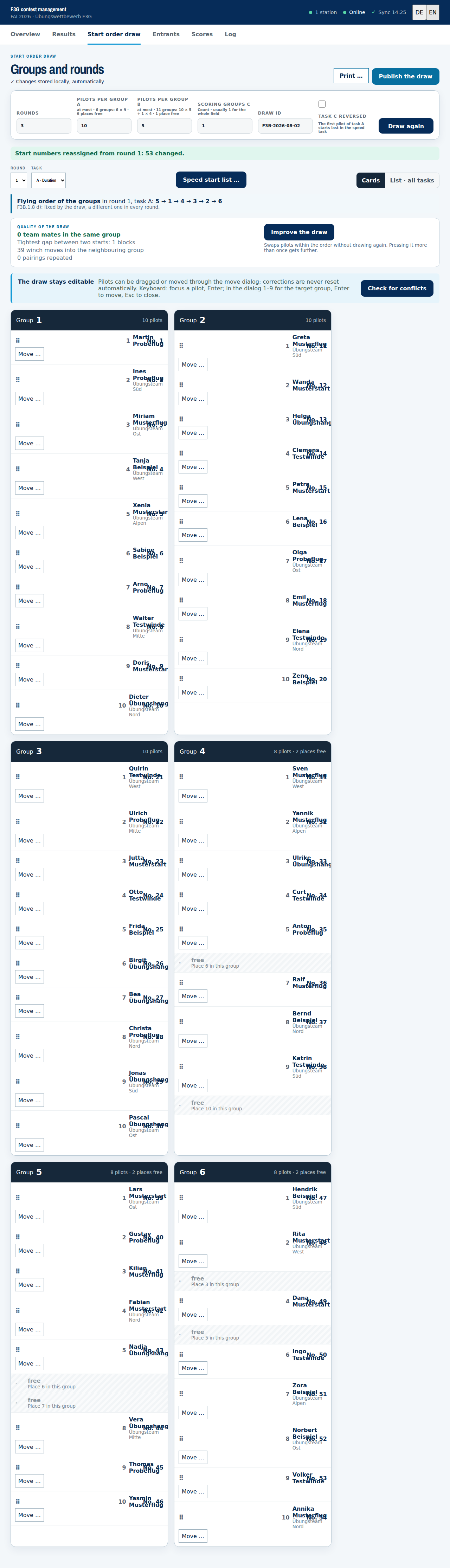
After Draw again the groups are there and can still be edited:
- Move. Individual pilots change group. Move shows the permitted targets with the resulting group size and points out team mates.
- Check for conflicts. Team mates should not fly in the same group. The check names the places where that happened.
- Speed start list. Task C is not flown in groups but one competitor after another. The order follows the inverted standings of all tasks flown so far (F3G.1.9 b), so the leader starts last.
- Three or four start blocks. The field is divided before task C begins. As long as the weather holds, one field is scored: all blocks share one scoring group.
- Rain break. If an interruption lasts more than 15 minutes, each block is scored separately and the interrupted block flies again from the start. There is a switch for that in the speed dialog. It does two things: the blocks become scoring groups, including for results already recorded, and the results of the interrupted block are deleted. The dialog says how many results that affects before it happens.
- Flying order of the groups. Which group flies first is drawn and differs in every round (F3G.1.9 d). It stands above the draw.
- Task C reversed. A switch in the settings bar reverses the order for the speed task: whoever starts first in A starts last in C. That is the same draw read from the back, and it creates a gap between two starts.
- Improve the draw. Four figures stand above the groups: team mates in the same group, the tightest gap between two starts, start slot moves into the neighbouring group, and repeated pairings. The button swaps pilots within the order and keeps what lowers those figures. It does not draw again, and it can be pressed more than once. Every fresh draw already runs through this method, so “nothing left to gain” is the normal case. Next to them sits a small bar chart: how often any two pilots meet. Below it the unevenness — 0 would mean everybody meets everybody equally often. It is not a mark but a way to compare two draws of the same field. All pairs are counted, including those that never meet; otherwise every draw would look even.
- Seed groups by the standings. A switch below the figures forms the groups of the rounds not yet flown by the standings: the lowest scoring pilots fly in group 1, the highest in the last. This is known as Seeded Man-on-Man. In this class that is unusual; it is common in F3K and F5J. The switch is off until somebody turns it on, and it only takes effect from the second round — before the first flight there are no standings. Rounds that already hold a result stay untouched: reordering them would no longer be a draw. Where the standings and the team rule contradict each other, the team rule wins — the standings are a wish, separating team mates is a rule.
- Sub-teams. Three team mates and two groups cannot be separated; one of them has to sit with a colleague. Whoever decides which two may fly together enters a sub-team in the participant list (“A”, “B”). For the draw those are two teams; for the scores and the lists it stays one team.
- Print. What hangs at the line is a sheet of paper, not a tablet. Behind Print … are six sheets: the start list for the competitors and the score sheet for writing at the line without a network, each for all rounds, for the round currently selected, or for the speed task. Speed has its own sheet because its order only emerges from the standings of the tasks already flown and is not settled in the morning. The sheets follow the lists this sport knows: one table per round, one row per competitor, and the groups of duration and distance appear as separator rules inside it. One round fits on one page. The score sheet leaves a column free for the start height.
- Publish the draw. Only then do the other devices see the same start list. The button sends it to the server itself and tells you whether it arrived — you do not have to press Sync now afterwards. Without a network it stays queued and goes with the next synchronisation. This has nothing to do with the website: the start list becomes public only through a switch of its own, see The start list on the website.
Free places and where they sit. When the field does not divide evenly, places stay free — with 54 competitors in groups of ten, six of them. They are not spread evenly but handed out from the back: 54 competitors become 10, 10, 10, 8, 8, 8. The reason is the reflight. Under F3G.1.6 d it belongs into an incomplete group first, and that group has to lie behind the incident — a free place in group 1 is of no use to anyone who flew in group 1. At most two per group, so the groups stay comparable in size; if the group size you set is far above the field, it was meant as an upper bound and the field is divided evenly as before.
Where the free place sits inside the group is drawn as well — sometimes in the middle, sometimes at the front, sometimes at the end. It used to be always the last, which meant every reflight was appended at the back. The order of the competitors does not change; only the position numbers inside the group move.
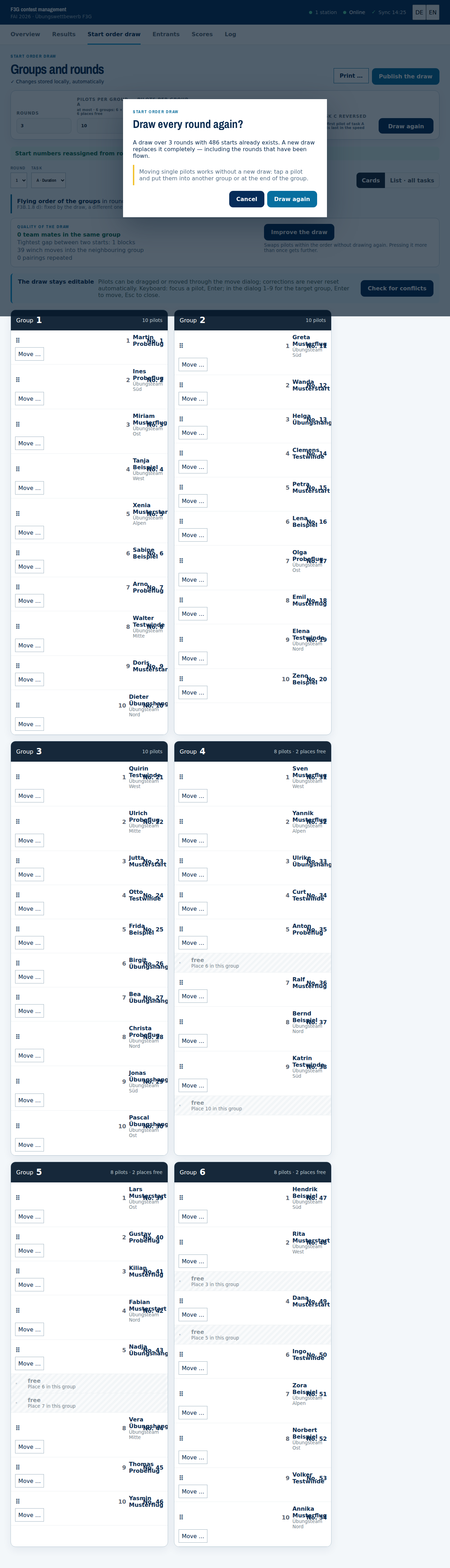
Scoring is calculated within the group a flight was flown in. With the first result the group is therefore fixed. Drawing again after that changes only the start order of the open rounds. The scoring of the rounds already flown stays as it is. Before a new draw runs, the app asks and names the number of affected rounds and results.
Entering results
The path through the contest is the one you walk at the line: round, task, group, pilot. You start on the overview and tap the cell of the grid that is due.
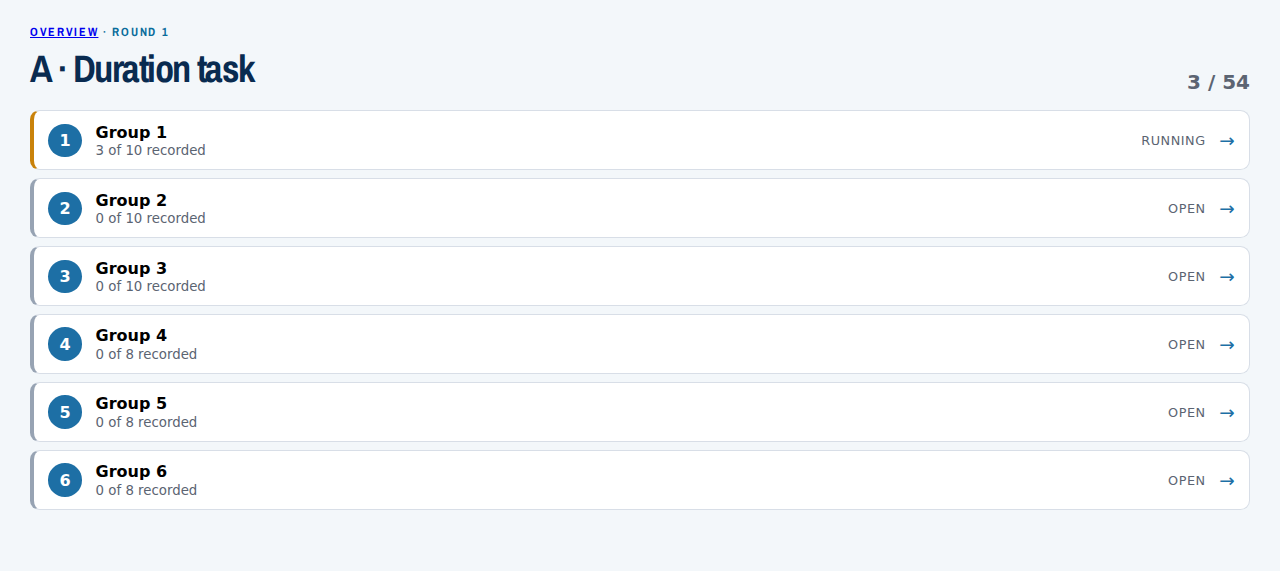
The list shows every group with its state (open, running, done) and the number of results in it. For task C it is called a start block, because it is flown one competitor at a time and there is no group scoring.
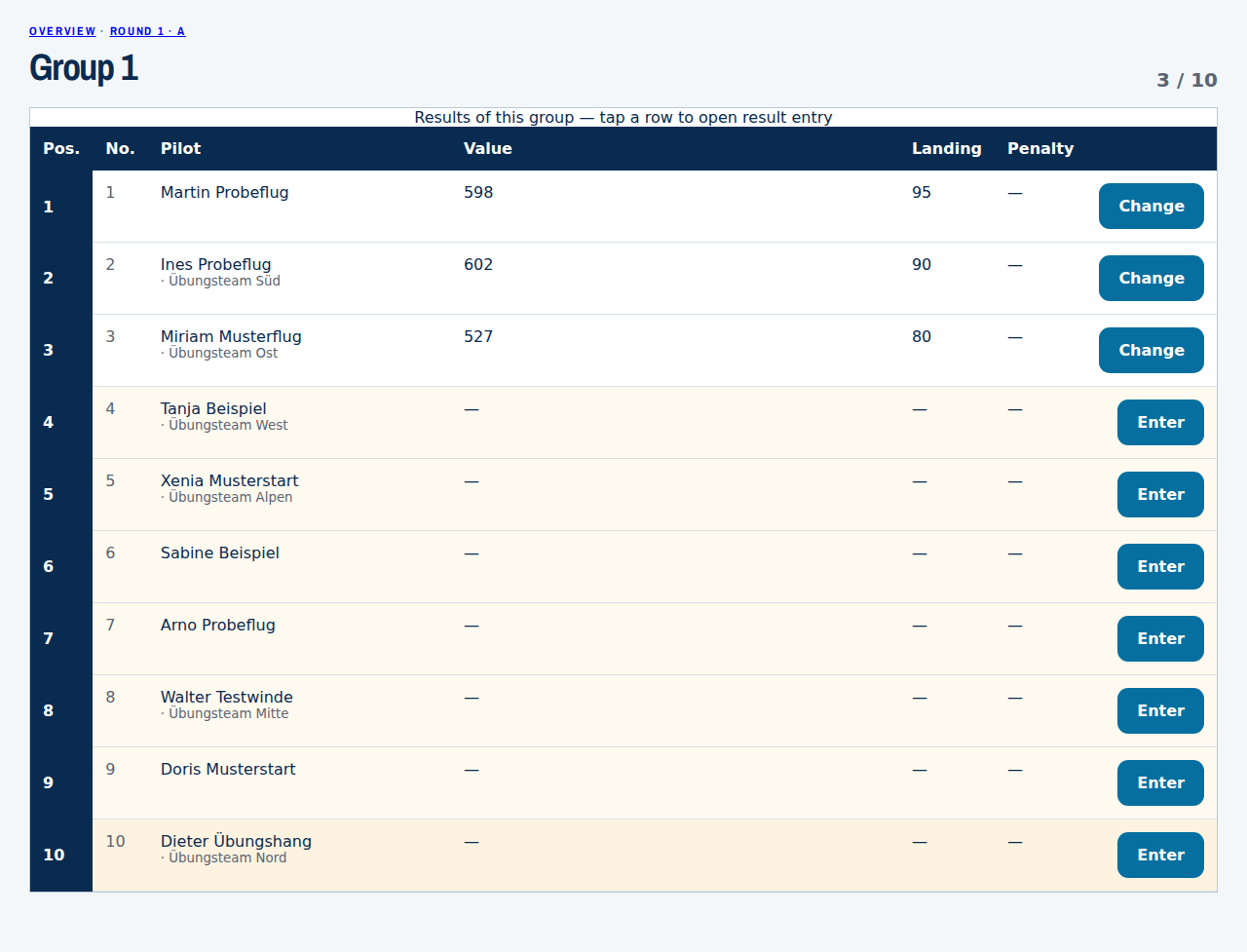
The group then stands there as a table, with every value at once. A typo shows up in this view. Tapping a row opens the form for that pilot.
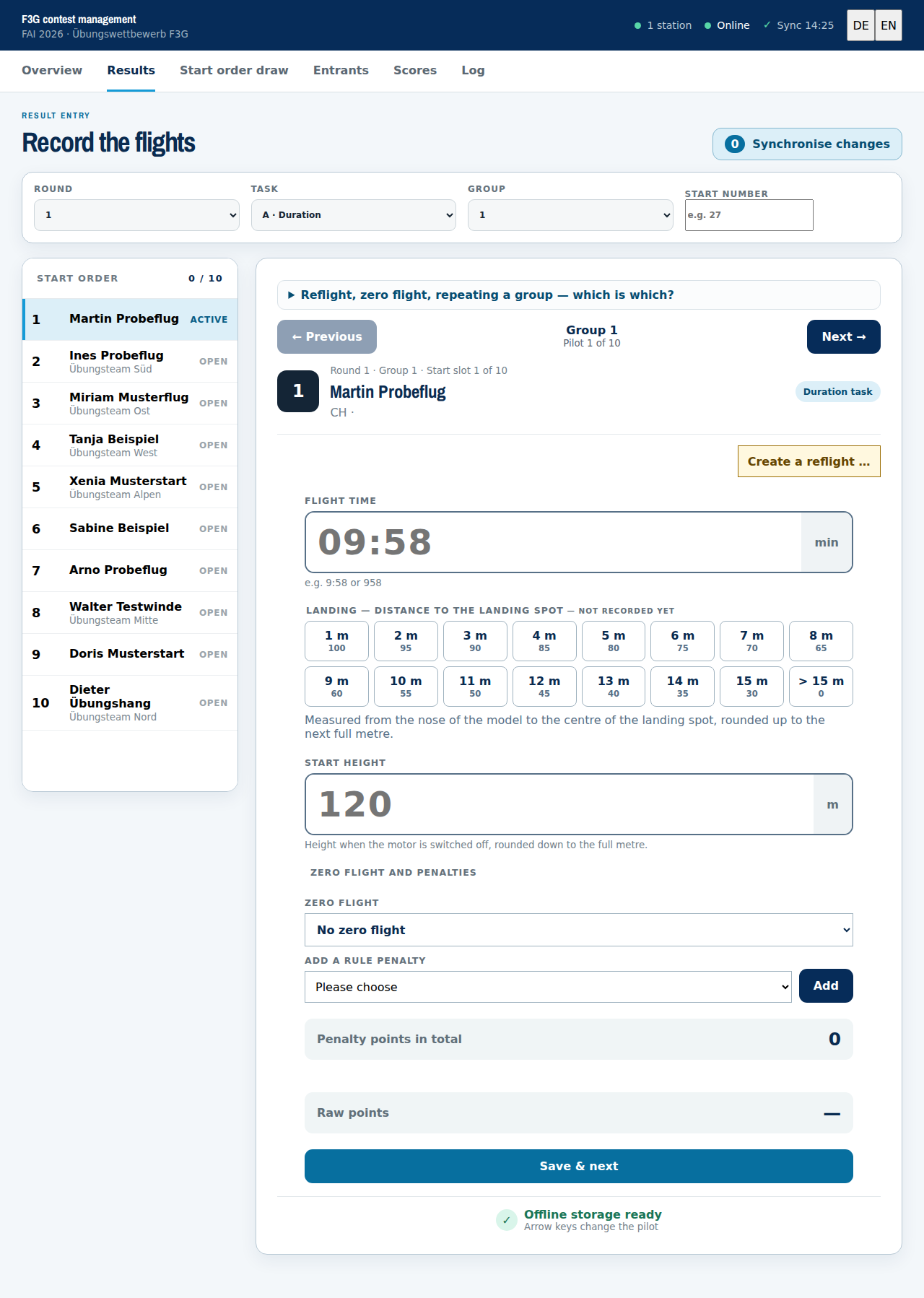
Above the form you see where you are, for instance Group 2 · Pilot 3 of 8, with the arrows to the next and previous pilot to its left and right. On a laptop the arrow keys do the same. Both stay inside the group, so the group does not change unnoticed.
After saving, the form moves to the next pilot without a value. When the group is full, a dialog asks how to continue: on to the next group or task, check the group once more, or repeat the group where the rules require it. The app does not jump on by itself.
Faster than the lists are the three select boxes at the top and the Start number field. Both lead straight to a pilot.
The form follows the task:
- A · duration. Type the flight time,
9:58or958, both are understood. Then tap the landing bonus from the table — fifteen fields up to 100 points — and enter the start height in metres. - B · distance. The number of completed legs.
- C · speed. The time for four legs.
Without a start height a duration flight cannot be saved. That is deliberate: the deduction under F3G.2.6 a) would be missing and the flight would score too high — plausible and wrong. Below the raw points it says what the height cost, so a misread altimeter shows up there and not in the final scores.
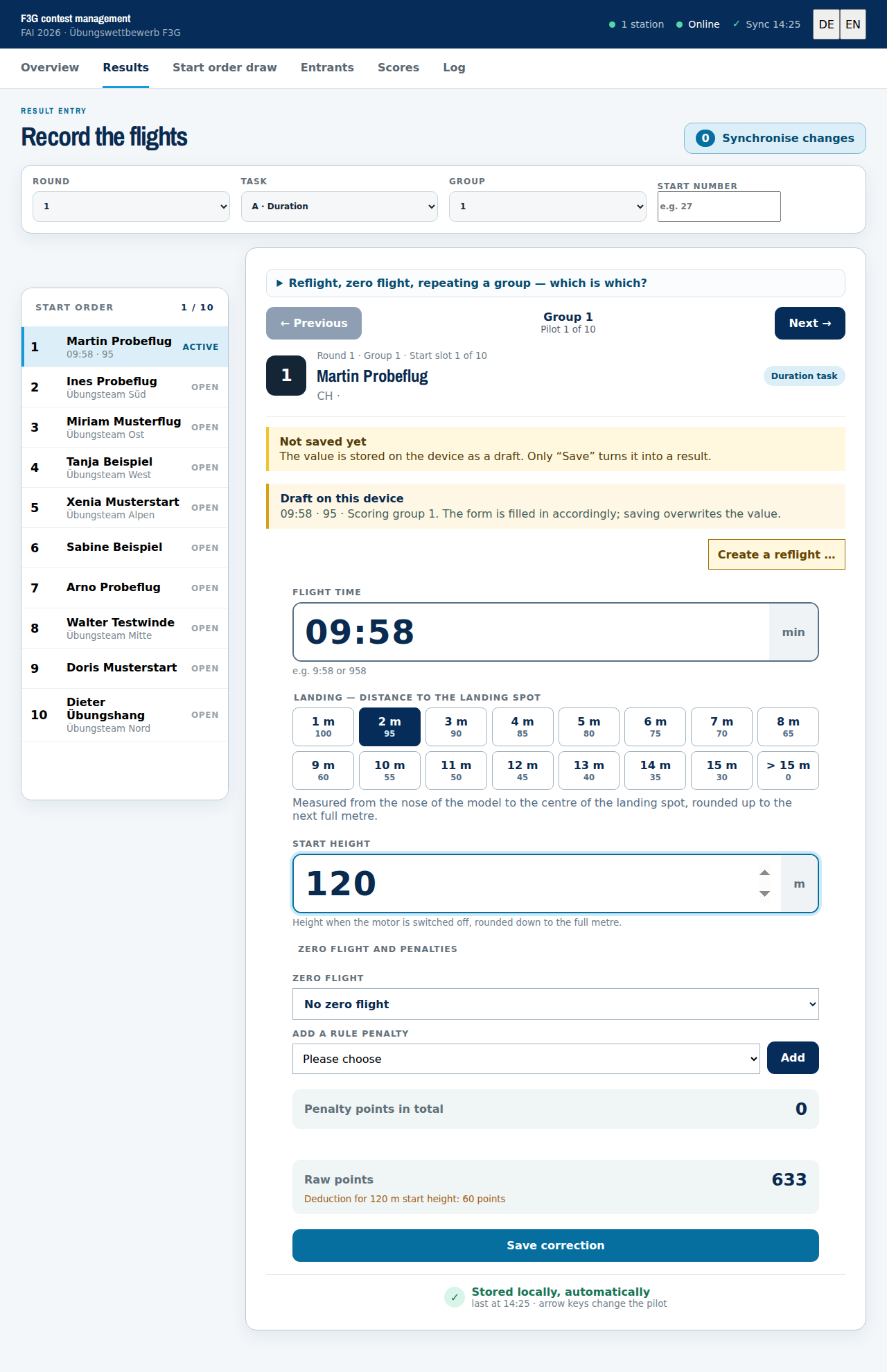
Below the form stands the calculation, raw points and penalty points separately. A typo shows up here before it reaches the scores.
Two cases occur regularly at the line:
- Create a reflight. When a pilot is entitled to a repeat flight, that repeat is stored as a new attempt. The original flight is not overwritten, both stay in the log. Where it is flown is said by F3G.1.6 d), and the rule is shorter there than in F3B: in a group that is not full, otherwise in a newly formed group. It goes no further. The fallback to the pilot's own group that F3B allows does not exist here — and with it neither competitors who come along nor a “better of two”. The dialog therefore does not offer it at all. If the incident affected several pilots, tick them as further entitled pilots; they then form the new group together.
- Repeat the group. For the whole run, for instance after a rain break or when the rules leave only one valid result (F3G.1.9 c). The reason is recorded.
A correction is another entry for the same pilot in the same round and task. It replaces the value and creates no new attempt. That is what separates it from a reflight.
Scoring
Scoring follows FAI: within each group the best value becomes 1000 points and all others in proportion to it. In task C the shortest time counts as the best.
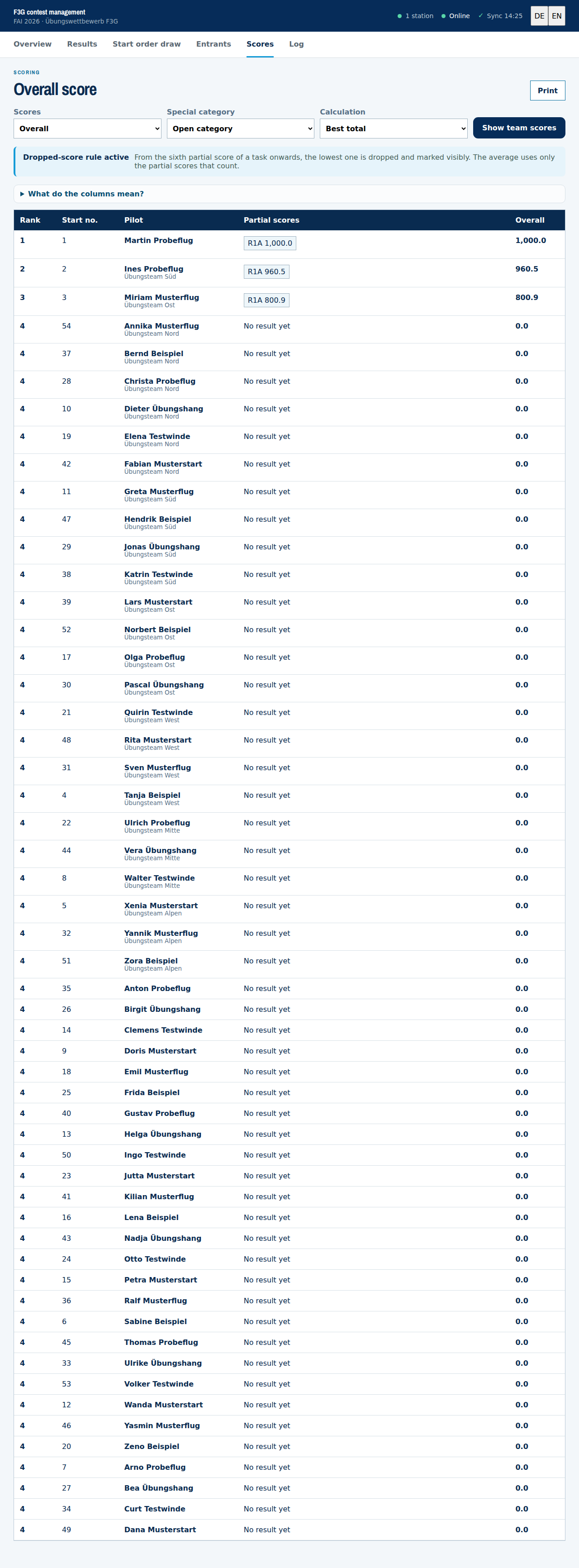
- Partial scores stand next to the overall result one by one, so it is visible where a placing comes from.
- Dropped-score rule: from the sixth partial score of a task onwards, the lowest partial value is dropped and marked visibly (F3G.2.8).
- Ties are shown but not resolved. Under F3G.2.8 an additional round over three tasks decides them. The application creates that round at the press of a button; the rounds already flown stay unchanged.
- Team scoring and special categories can be switched without touching any entry.
- Print produces a list that can hang at the tent.
The start list on the website
Publish the draw shares the list with the devices at the line. Whether it also goes online is a second decision, and rarely one you take in the morning: publishing the draw before the first launch gives it away. The switch sits in the cockpit under Devices and access and reads Make start list public.
Two things belong with it:
- Public means public. Anyone who knows the link sees the list. It is not hidden, it is freely available, just like the results. A draft stays out: as long as the competition is unpublished, the release has no effect.
- Separate from the results. Start list and results have their own switches because they matter at different times — the list the evening before, the results after. The start list can be released before a single result has been entered.
Competitors find themselves. The public list carries a chooser That's me at the top. Whoever picks themselves sees their own rows highlighted and those of their team mates in a second colour — across 486 rows that is the difference between searching and reading. Besides the colour each mark carries a symbol, so it survives a black-and-white printout and a red-green deficiency, and it applies to the printout as well. The choice stays in the visitor's browser and does not go to the server: who looks at whom is not something this page needs to know. No account is required — helpers and spectators can do it just the same.
Device access, and who may change what
At the line several devices write at the same time: a tablet at the timing, one at the line, one in the scoring tent. Each needs its own access, and every access needs your confirmation. It is managed in the cockpit under Geräte und Zugang (devices and access).
Registering a device
For your own device the cockpit route is enough: F3B Wettbewerbsleitung starten. You are logged in there, so a second confirmation would be a question to yourself.
Another device takes the other route. It opens the address of the competition, gives a name and enters the enrolment secret you set. It then appears in your list as a request. Only when you confirm may it load data and write results; until then it can do nothing, not even read. The secret alone is therefore not access, only the ticket into the queue.
When confirming, you give the device its name. That name appears in the contest log afterwards, and the device cannot change it. This makes the line in the log a statement rather than a claim.
Scope
When confirming you also decide what the device may do: all tasks, one particular task, or read only. The tablet at the timing needs task A and nothing else. If it later sends something else, that entry is rejected with a reason and the rest is still accepted.
Rank
On confirmation every device is given a rank: 1 for contest management, 3 for an experienced station, 5 for a normal one, 7 for a stand-in. The rank does not change who may write — that is what the scope is for — and it never silently overwrites anything.
It answers a single question: when two devices write to the same value, who settles it? The conflict is reported as before and nothing is discarded. What is new is that the lower-ranked station is told whose value is standing: "These values belong to the scoring tent — they are settled there, not here." Without that, two stations write over each other in turn, each in good faith that it has the right figure.
Your own device, started from the cockpit, always has rank 1. The device list shows the rank next to the scope.
Revoking
A lost or lent tablet is revoked in the list, one at a time or all at once. Afterwards it can neither write nor load data, and it needs a new registration with confirmation. The list shows for every device when it was last used. A device you cannot place should be revoked.
Closing the scores
When the last flight is recorded, close the scores. After that the server rejects every change, no matter which device sends it; reading and printing still work. Only you can open it again.
Audit log
Under Prüfprotokoll (audit log) you find every change that reached the server: time, device, pilot, round and task, and the value before and after. That answers the question “who changed the value of number 5 at 14:12?” without depending on a device.
The contest log in the app and the audit log complement each other. The log shows what happened on this device, including without a network and including things that never reach the server. The audit log shows what arrived, across all devices, and it stays when a device is deleted or revoked. No IP addresses and no browser fingerprints are stored for it.
Where the key is, and what it is worth
The access key of a device sits behind the # in the address and is taken
from there into the device's storage at once. A browser does not send a fragment behind the
# to the server, so the key appears in no server log. On the server it is
stored as a checksum only, never in clear text.
On the device it lives in the browser's storage, and it has to: without it there is no work without a network. From that follows the important part: whoever holds the unlocked device holds the access. So: do not forward the start link, do not leave the device unattended, and before passing it on, delete the data under On this device and revoke the access in the cockpit.
The package file (.mgpkg) holds participants, start list and
draw, but no access key. It therefore cannot synchronise, and a copy opens
no access. Only someone who may edit the competition can download it; anonymously it is
blocked. Its checksum detects changes, it does not prevent them.
Contest log
The Log tab records what happened during the day: the draw, pilots that were moved, results recorded and corrected, zero flights with their reason, reflights, group repeats, synchronisations. Every line carries the time and the name of the entry station.
In the evening this answers questions such as “why did number 5 get a second attempt?” or “who changed the time of number 2?”. The Print button produces a sheet for the contest file.
The log lives on the device that made the entries. It does not travel with the synchronisation. With two entry stations each one has its own; print both for the file.
Offline and synchronising
Every entry is stored on the device first and sent to the server afterwards. That is why the application can be used offline: a missing network at the field only means the transfer waits.
- Pending entries on the overview is the figure that matters. At 0 the server has everything.
- Synchronise now sends the changes as soon as there is a network again. The button is disabled when there is nothing to send.
- Several devices share the start list and the results through the server. Whoever synchronises first is there first. Conflicts are reported and not silently overwritten.
- At the end of the day synchronise once until 0 pending entries remain. Only then may the device be switched off.
The header says when something last arrived
Top right, next to the connection dot: Sync 14:12. That is the last exchange with the server, in both directions. After five minutes without contact the figure turns yellow and gets a warning sign — roughly the time one round with one group takes. If you have finished writing a group and still see green, it has arrived.
Yellow does not mean something is lost. It means this device has not reached the server for five minutes. Once there is a network again, the app fetches the state by itself and the figure turns green without anyone doing anything. If it stays yellow, the device is in a dead spot: keep working and synchronise later, the entries wait on the device. The Pending entries counter on the overview says how many.
Your own entries still go to the server only when you press the button. That is deliberate: what ends up in a score should have been sent by a person, not by a timer.
What happens if the device is switched off before synchronising?
Nothing is lost. Every saved value lies in the device's storage, not in memory: empty battery, crash, device off, app closed, all the same case. On the next start the figure under Pending entries is exactly as it was, and Synchronise now catches up as soon as there is a network again.
A value that has been typed but not saved is also on the device, but as a draft: it counts in no score and does not travel with the synchronisation. The form says so, and it asks when you leave the view. If you want to keep the draft, save it; otherwise it is only a note.
Two cases where something does disappear, both avoidable:
- Clearing the browser data or a private window: the storage is gone, including the access key. Synchronise first.
- On iPhone and iPad without installing: if the site is not used for a long time, iOS may clear Safari's storage. As an installed app (Share → Add to Home Screen) it stays. So install it for the contest day instead of working in a browser tab.
When the competition is gone or the scoring is closed
Two states in which the app accepts nothing more, and it says both instead of hiding them:
- Scoring closed: a yellow band above every view. Reading and printing still work, changing does not — the server accepts no more results. If something still needs correcting, have the scoring reopened in the cockpit.
- Competition deleted: a red band, and a page that says so the next time you open it. The results on the device are not gone: there is a button there that saves them to a file. That is the way out if a competition was deleted by mistake — save the file, create the competition again, read the file back in.
Both are statements from the server, not guesses by the device. A dead spot looks different: everything keeps running there, only the time in the header turns yellow.
The back button
Inside the app, back walks through the views as you would expect: from result entry to the group, from there to the round, then to the overview. Two places are guarded:
- A typed but unsaved value stops the change and asks.
- On the overview back would close the app. The first press does not; it says so instead. The second press within three seconds goes.
The back button cannot be switched off, and no website can do it. If you really want to nail a device down, do it in the operating system: Android screen pinning, iOS guided access. Then there is no navigation and no app switching until it is lifted again. That is the way for a tablet lying at the tent with many people walking past. As an installed app the browser bar is gone anyway.
Opening the app online once is enough. On the first start it stores itself on the device, program and start page. After that it comes up without a network too, after a reload and after the device was switched off. Without that one start with a network there is nothing present that could run offline.
Three things lie on the device while you work: the access key, the recorded flights and the files for running offline. If you pass on a borrowed tablet, clear it on the overview under On this device → Delete the data on this device, in one go and with a warning if something has not been transferred. What already reached the server stays there. The full list is in the privacy policy.
Starting without a network: the contest as a file
The route through the cockpit needs a network once. If there is none at the flying site,
it also works without: download the contest at home as a package file (.mgpkg)
and open it at the field in the app under Load competition. Start list,
participants and draw are then present without the device ever having opened the site.
The way back works the same: Results as a file saves what is on the device, and the organiser reads that file into the competition in the cockpit under Ergebnisse aus Datei einlesen (import results from file), with a preview before anything is accepted.
Two notes belong with this:
- The file holds no access key. It contains data only. A device working from a file therefore cannot synchronise; the way back leads through a file again.
- Tampering shows. Every file carries a checksum, files from this site additionally a signature. Edit one in a text editor and it is read neither in the app nor on the server. That is tamper detection and not protection: anyone who recalculates the checksum gets through. It catches accidental editing.
On a phone
The application is built for small screens: the navigation wraps, the entry fields stay large, the grid of rounds can be pushed sideways. The group table fits on a phone without having to be pushed. The penalty column steps back for that, and its value is in the form.

When something is stuck
- “Not ready to start” means this device has no valid access key. Press F3B Wettbewerbsleitung starten in the cockpit again.
- The participant list is empty. The competition has no registrations yet, or the device was offline when it was first opened. Open it online once.
- Pending entries do not go back to 0. There is no network, or the access key has expired. The data stays on the device, nothing is lost.
- A value is wrong. Select the same round, task and pilot and save again. The history is kept.
- The device is to be passed on. Synchronise first until 0 pending entries remain, then delete the data on the overview under On this device. After that it needs a new start link.
Everything here can be rehearsed on the practice competition without a real competition noticing. Shorter questions are answered by the help.